FreeDive Ultra The freediving and spearfishing app for Apple Watch Ultra
Dive tracking that works the moment you hit the water. Zero touch required. Just dive.

Dive in. We handle the rest.
Start a session
Open water, pool, or dry apnea. Pick your mode and tap once on your Apple Watch Ultra. Water lock activates. FreeDive Ultra begins monitoring.
Dive or train
Every dive and breath-hold is detected automatically. Depth, time, and temperature tracked second by second. A recovery timer starts the moment you break the surface. The Digital Crown moves between screens, and the Action Button acts on whichever screen you are looking at.
Review on iPhone
Sessions sync automatically. Dive into your session stats and charts, then explore individual depth profiles for every dive. Add photos and video, rate conditions, and log notes. See your route on a map, revisit any locations you pinned, and curate up to 10 dive sites to navigate to from your watch.
Everything you need at depth. Nothing you don’t.
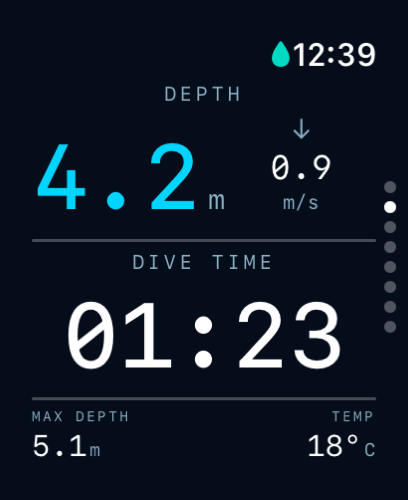
Live Dive
The only screen you see while underwater. Current depth (cyan), descent or ascent rate beside it, dive time, and a running max depth and water temperature at the bottom. Everything you need at depth, nothing you don’t.
More on the features page →The dive doesn’t end at the surface.
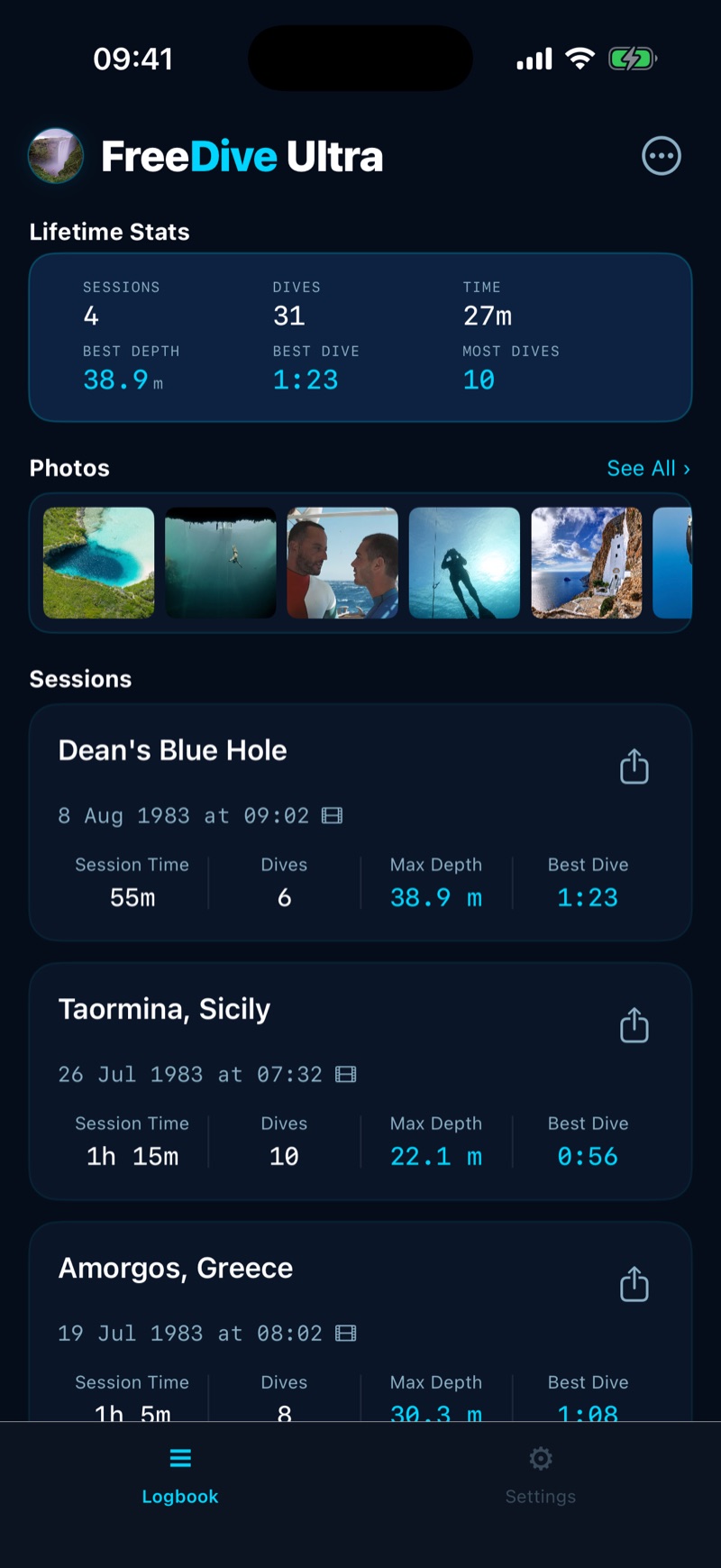
Your dive history
Every dive you’ve taken, all in one place. Lifetime stats up top: total sessions, total dives, total time in the water, best depth, longest dive. A strip of photos from your recent trips below. Then every session you’ve logged, most recent first. Tap any one to open the full story of that day.
More on the features page →Your logbook on the big screen
Sign in at app.freediveultra.com with the same account and open your whole logbook in any browser. Edit titles, notes and conditions there, and the changes land on your iPhone.
Open your web logbook →6m depth today. 40m on the way.
Start with a working dive watch.
Upgrade when you’re ready.
- ✓ Watch: Automatic tracking with real-time depth, dive time, and surface recovery with live heart rate
- ✓ Watch: Pool and dry apnea training
- ✓ iPhone: Session history
- ✓ iPhone: Import your dive history (UDDF and other formats supported)
- ✓ iPhone: Demo dives (fully explorable)
- ✓ iCloud backup
- ✓ Everything in Free, plus:
- ✓ Watch: Session, Speed & Compass screens
- ✓ Watch: Dive spot navigation & GPS pins
- ✓ Watch: 8 alarms you feel through your wetsuit
- ✓ Watch: Route: your path, distance and markers
- ✓ Watch: Live Share: share your session with friends
- ✓ iPhone: Full session detail with stats and heart rate
- ✓ iPhone: Per-dive depth, temp & speed profiles
- ✓ iPhone: Your route and saved pins on a map
- ✓ iPhone: Photos, video, conditions, ratings, notes
- ✓ iPhone: 3D Flyover replay of your route
- ✓ iPhone: UDDF export
What freedivers ask.
Which Apple Watch does FreeDive Ultra work on?
Every Apple Watch Ultra: the original, Ultra 2, Ultra 3 and Ultra 4. It runs on the depth sensor, and only the Ultra has one.
Is FreeDive Ultra free?
Yes. The free tier is a real dive watch: automatic tracking, real-time depth and dive time, surface recovery with live heart rate, pool and dry apnea training, your dive list on iPhone, iCloud backup, demo dives and UDDF import. No subscription, no time limit. Pro adds the rest, with a 7-day free trial.
How deep does it read?
Live depth on the wrist reads to 6 metres while we work with Apple on the full 40m entitlement. The moment you surface, each dive is corrected to its true depth, so your logbook is right. Every other feature works at any depth.
How do I set it up?
Install the watch app, allow the three permissions it asks for, then run Watch Setup on iPhone. Auto Launch starts a session when you submerge, and the Action Button is yours to assign. The setup guide walks through all of it.
Do I have to touch the screen in the water?
No. Water lock disables touch, so dives are detected automatically. The Digital Crown moves between screens and saves a pin, and the Action Button acts on whichever screen you are on. Both work through gloves.
Can I bring my existing dive log?
Yes. Import any UDDF export on iPhone, from Oceanic+, Shearwater, Suunto, Garmin, Atmos or any dive app or computer that writes UDDF, and every session appears with its full depth profile. Import is free. Export is Pro.
Ready to dive?
Download FreeDive Ultra and start tracking your dives today. Free to get started. Upgrade whenever you’re ready.